6 Best Tablet Stands For Following Digital Patterns
Find the perfect tablet stand for your craft. Our top six picks offer stability and adjustable angles, making it easy to follow digital patterns hands-free.
Transitioning from paper charts to digital patterns can feel like a daunting step for many traditional knitters. However, having your pattern at eye level significantly reduces neck strain during long sessions of intricate colorwork. Finding the right tablet stand is the secret to keeping your progress smooth and your posture healthy. These six options are curated to help you maintain your flow, whether you are working on a complex lace shawl or a simple stockinette sweater.
Lamicall Gooseneck: Best for Hands-Free Knitting

The Lamicall Gooseneck is a game-changer when you need your pattern to hover exactly where your eyes naturally fall. Its long, flexible arm allows you to position your tablet over your shoulder or directly in front of you without it occupying precious table space.
If you are working on a project that requires constant focus—like tracking a multi-row cable repeat—this stand ensures you never have to look down and lose your place. You can clamp it to the side of your favorite knitting chair or a nearby side table.
The main trade-off is the "bounce." If you are a vigorous knitter who moves your arms significantly while working, the tablet might sway slightly. For calm, rhythmic knitting, however, it is an unbeatable way to keep your hands free for your needles.
AboveTEK Aluminum Stand: Best for Heavy Tablets
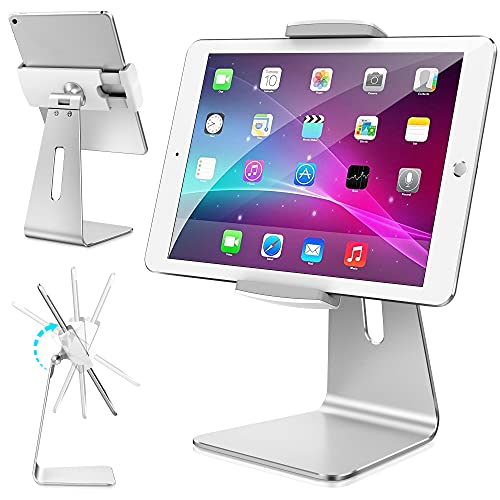
If you use a larger tablet for high-resolution PDF patterns, you need a stand with serious structural integrity. The AboveTEK is built from sturdy aluminum, which prevents the "sag" that often happens with cheaper plastic models when supporting a heavy device.
This stand is ideal for knitters who prefer reading charts on a full-sized tablet. Its weight ensures that even if you accidentally bump the table, your pattern remains stable and upright.
Keep in mind that this stand is not particularly portable. It is best suited for a dedicated "knitting nook" where you keep your yarn stash and notions organized.
Twelve South HoverBar: Best for Adjustable Angles

The Twelve South HoverBar offers a professional-grade articulation that feels like an extension of your own workspace. It is perfect for knitters who frequently switch between sitting upright and reclining.
Because it features multiple pivot points, you can tilt your screen to eliminate glare from overhead lighting. This is vital when working with dark-colored yarns, where you need maximum contrast to see your stitches clearly.
While the price point is higher, the build quality justifies the investment for serious makers. It is a reliable tool that won’t give out in the middle of a complex lace project.
Moft Invisible Stand: Best for Traveling Knitters

For the knitter who never leaves home without a project bag, the Moft Invisible Stand is a revelation. It attaches directly to the back of your tablet and folds completely flat when not in use.
You can slip it into the same pocket of your project bag that holds your circular needles and stitch markers. It provides just enough lift to make reading a pattern on a coffee shop table comfortable.
The trade-off is that it lacks the height adjustability of larger stands. It is designed for portability and quick setups, not for long-term ergonomic workstations.
UGREEN Tablet Pillow: Best for Lap Knitting Time

Sometimes the most comfortable place to knit is curled up on the couch, and a hard stand simply won’t work there. The UGREEN Tablet Pillow sits securely on your lap, providing a soft, stable base for your screen.
This is a fantastic solution for knitters who find that hard stands dig into their legs or shift around on fabric surfaces. It keeps the tablet at a slight incline, which is much kinder to your neck than looking straight down at your lap.
Because it is fabric-based, it can collect lint from fuzzy fibers like mohair or wool. A quick lint roll every few sessions will keep it looking fresh.
Tablift Flexible Stand: Best for Couch Knitting

The Tablift features four flexible, spider-like legs that can be adjusted to straddle your knees while you sit on the couch. It is the ultimate companion for those marathon knitting sessions during winter evenings.
It provides a level of stability that pillows cannot match, as the legs can be locked into position. This is particularly helpful when you are working on a pattern that requires you to tap the screen frequently to advance your row counter.
It is a bit bulky to store, so it is best for knitters who have a designated "couch spot." If you value stability over portability, this is your best bet.
How to Position Your Tablet for Ergonomic Knitting
The goal of your setup should be to keep your head in a neutral position rather than tilted downward. A "knitter’s neck" often stems from hours of looking down at a pattern or needles, which strains the cervical spine.
Position your tablet so the top third of the screen is at eye level. This allows you to glance at your chart and then back at your needles with minimal movement.
Always ensure your lighting source is positioned to hit the screen without creating harsh reflections. If you are knitting with dark yarn, consider a screen protector with a matte finish to reduce glare.
Why Digital Patterns Change Your Knitting Workflow
Digital patterns allow you to zoom in on complex charts, which is a massive advantage for intricate colorwork or lace. You can see every stitch detail without squinting or needing a magnifying glass.
Many apps also allow you to highlight your current row, which eliminates the need for manual row counters. This reduces the cognitive load, allowing you to focus on your tension and stitch consistency.
However, be mindful of battery life. Always keep a portable power bank in your project bag so your pattern doesn’t vanish in the middle of a critical row decrease.
Essential Features for Knitting-Friendly Stands
When choosing a stand, look for adjustability, stability, and compatibility with your specific device. A stand that wobbles will only distract you from your craft.
- Non-slip pads: Prevents the stand from sliding on smooth surfaces.
- Charging port access: Ensures you can keep your tablet plugged in while knitting.
- Weight capacity: Must support your specific tablet size comfortably.
- Portability: Consider if you need to take your setup to knitting guild meetings.
Prioritize stands that allow for quick adjustments. Your posture will naturally shift over a three-hour knitting session, and your stand should be able to move with you.
Maintenance Tips for Your Digital Knitting Setup
Treat your tablet stand with the same care you give your wooden needles. Wipe down the joints occasionally to ensure the hinges remain smooth and don’t seize up over time.
If you use a fabric-based stand, check the seams periodically, especially if you carry it in a bag full of sharp metal needles. A small snag can turn into a larger tear if left unattended.
Finally, keep your tablet screen clean with a microfiber cloth. A clear, smudge-free screen makes reading complex lace charts significantly easier on the eyes.
Investing in a quality tablet stand is just as important as choosing the right yarn for your project. By elevating your pattern and your posture, you ensure that your knitting remains a joy rather than a source of physical strain. Choose the option that fits your specific knitting environment, and you will find your rhythm in no time. Happy knitting, and may your gauge always be spot on.