6 Best Row Tracking Apps For Complex Charts To Use
Optimize your fitness data with our top 6 row tracking apps. Discover tools that offer complex charting and deep performance insights for every workout session.
Navigating complex charts for lace, cables, or stranded colorwork can quickly turn a relaxing hobby into a frustrating game of counting rows. Relying on paper patterns often leads to lost place-markers, smudged ink, and the dreaded "where was I?" moment after a long day. Digital row tracking apps have revolutionized the craft by keeping your place precisely, whether you are working on a simple garter stitch scarf or an intricate, multi-page Fair Isle sweater. Choosing the right tool depends on your specific workflow and how much you prefer to interact with your pattern digitally.
KnitCompanion: Best Overall for Complex Charts
KnitCompanion is widely considered the gold standard for serious knitters who tackle complex, multi-page charts. Its ability to handle large PDF files without lag makes it an indispensable tool for those working on heirloom-quality lace projects.
The app’s standout feature is its customizable highlighting tools, which allow you to isolate specific rows or stitches. This is a game-changer when you are working with dark-colored yarns where seeing individual stitch definition can be a struggle.
While the interface has a steeper learning curve than simpler apps, the investment of time is worth it for the sheer level of control. If you are a project-focused knitter who likes to keep detailed notes on every row, this is the powerhouse you need.
Pattern Keeper: Best for PDF Pattern Imports
Pattern Keeper is a favorite among knitters who prefer a clean, streamlined way to view their charts. It excels at importing standard PDF patterns and converting them into an interactive format that tracks your progress automatically.
The app is particularly impressive because it recognizes chart symbols and allows you to tap them to highlight every instance of that stitch on the page. This is incredibly helpful for stranded colorwork, where you need to track how many stitches of a specific color remain in a row.
It is worth noting that Pattern Keeper is currently optimized for Android, which leaves some iOS users seeking alternatives. However, if you have a tablet that supports it, the simplicity of the interface allows you to focus entirely on your tension and stitch consistency.
My Row Counter: Best for Interactive Features


My Row Counter bridges the gap between a simple tally tool and a full-featured pattern manager. It is designed for knitters who want to keep their hands busy with their needles rather than fiddling with complicated software.
One of its most engaging features is the voice-command functionality, which lets you increment your row count without touching your screen. This is perfect when your hands are covered in yarn dust or when you are working with delicate fibers like silk that you don’t want to snag on a screen.
The app also provides a great way to store multiple projects simultaneously, making it ideal for those of us who tend to have a "sock project" in the bag and a "sweater project" on the needles. It is a reliable, user-friendly choice for the everyday maker.
BeeCount: Best Minimalist Row Tracking Tool
BeeCount is for the knitter who finds modern apps cluttered and distracting. It focuses on the singular task of counting rows, providing a minimalist interface that gets out of your way so you can just knit.
The beauty of this app lies in its simplicity; you won’t find complex chart-tagging features here, but you will find a rock-solid counter. It is perfect for repetitive stitch patterns or long stretches of stockinette where you simply need to track your progress toward the next decrease row.
Because it is so lightweight, it runs efficiently on older devices without draining your battery. If you prefer to keep your chart on paper but want a digital "clicker" to keep your place, BeeCount is the elegant solution.
Row Counter App: Best for Apple Watch Users
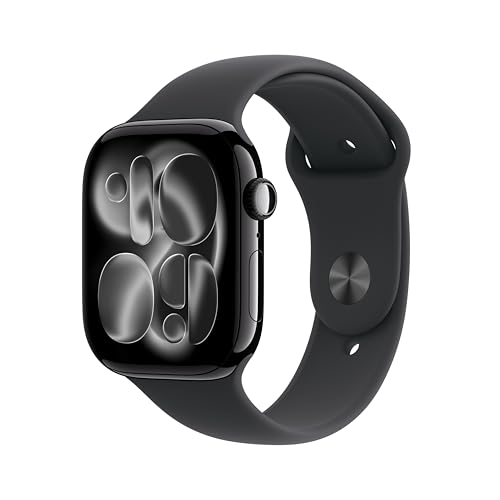
The Row Counter App is the top contender for those who want to integrate their knitting progress with their wearable technology. Being able to tap your wrist to advance a row is a seamless experience that keeps your rhythm intact.
This app is particularly beneficial for knitters who work on the go, whether on the train or at a knitting group. The integration means you don’t need to prop up a tablet or phone, which is a massive help when you are working with limited table space.
While the screen on a watch is small, the app does a great job of displaying the essential information you need at a glance. It is a fantastic choice for the modern knitter who values convenience above all else.
Knitting Chart: Best for Designing Your Own

Knitting Chart is unique because it allows you to both track your patterns and create them from scratch. It is an essential tool for knitters who like to modify existing patterns or design their own custom cable motifs.
The design interface is surprisingly intuitive, allowing you to drag and drop symbols to build a chart that reflects your personal vision. If you are a designer or a knitter who enjoys the technical side of pattern creation, this app offers a level of creative freedom that others lack.
Keep in mind that with such powerful design tools comes a bit more complexity in the menu navigation. However, the ability to turn your own ideas into a trackable chart makes it an invaluable addition to any advanced knitter’s toolkit.
Why Digital Row Counters Beat Paper Patterns

Paper patterns are prone to the "wear and tear" of the knitting bag, often becoming frayed or losing their place markers. A digital app keeps your pattern pristine, regardless of how many times you fold it or throw it into your project bag.
Digital tools also allow for dynamic zooming, which is essential when you are working with fine-gauge lace or tiny, intricate cables. You can enlarge the specific section you are working on, reducing eye strain during long sessions of knitting.
Ultimately, digital apps provide a level of archival security that paper cannot match. You can back up your patterns to the cloud, ensuring that even if you spill a cup of tea on your project, your instructions remain safe and accessible.
How to Sync Your Patterns Across All Devices
Most modern knitting apps offer cloud synchronization, which is vital for those who switch between a phone for quick checks and a tablet for detailed chart viewing. Always ensure you are logged into the same account across all your devices to keep your row counts current.
If you find that your progress isn’t syncing, check your internet connection and ensure your app is updated to the latest version. Many apps also offer an "offline mode," which is a lifesaver when you are knitting in a location without reliable Wi-Fi.
Consistency is key; make it a habit to sync your project as soon as you finish your knitting session. This simple step prevents the frustration of picking up a project on your phone only to realize your tablet still holds the "correct" row count.
Essential Features for Knitting Chart Apps
When evaluating a new app, prioritize those that offer PDF annotation and multi-counter support. You need to be able to track your main pattern rows while simultaneously keeping an eye on your repeat counts or increase intervals.
Look for apps that allow you to import patterns directly from your email or cloud storage services. A good app should act as a central hub for your entire pattern library, saving you from digging through cluttered folders.
Finally, consider the user interface and how it handles your specific project type. If you are a colorwork knitter, an app that allows you to highlight colors is non-negotiable; if you are a lace knitter, look for robust zoom and marking capabilities.
Troubleshooting Common Digital Chart Issues
The most common issue is the app failing to recognize a complex PDF structure, which can happen if the file is an image-based scan rather than a text-based document. If you encounter this, try using a PDF-to-text converter before importing the file into your app.
If your app feels sluggish or crashes, it is often due to the file size of the pattern. Large, high-resolution PDFs can tax older tablets, so try to compress your files or use a dedicated "knitting-friendly" version of the pattern if one is provided.
Lastly, don’t be afraid to reach out to the developer or check the app’s community forums if you run into a persistent bug. Most of these apps are built by passionate knitters who are very responsive to user feedback and eager to improve the experience for everyone.
Finding the right row tracking app is a personal journey that depends as much on your knitting style as it does on your technical comfort level. Whether you choose a high-powered tool like KnitCompanion or a simple clicker like BeeCount, the goal remains the same: to remove the friction of counting so you can focus on the joy of making. Experiment with a few options, see which interface feels most natural in your hands, and enjoy the peace of mind that comes with never losing your place again. Happy knitting!